Parent adjustment workflows can post journals to entities that belong to already-certified base workflows. When a central journal input post occurs to an entity owned by a certified base workflow, the system will:
-
Temporarily un-certifiy the impacted base workflow (and its ancestors) to In Process status
-
Allow the journal to post to the appropriate adjustment workflow unit (including Level 2 and Level 3 channel-based units)
-
Attempt to re-certify impacted workflows after posting
All certification changes are logged in the workflow audit trail.
NOTE: The parent workflow must be a journal input workflow, and the base workflow must be a central input journal.
Central workflow processing is controlled by a new property in the controlling parent adjustment workflow profile called, Perform Central Workflow Processing, and is located in the Data Quality section of the Adj property grid. It supports both tree-structured workflows and named dependent workflows that are assigned to review levels.
Central Workflow Processing Usage
The following procedure walks you through central journal input setup.
-
Enable central workflow processing on the controlling parent workflow:
-
Open the controlling parent adjustment workflow profile.
-
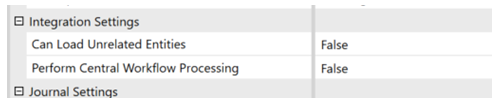
In the Integration Settings section, locate Perform Central Workflow Processing and set to True. This applies to scenarios where the parent workflow should post entries assigned to certified base workflows.
-
If you deploy via XML, make sure that XML and metadata templates are updated.
-
-
Configure central journal input:
-
On the base input adjustment workflow where journals are received centrally, make sure Central Journal Input is assigned.
-
-
Run the base workflow as usual.
Base entities complete their required tasks (Import, Forms, and Adjustments). Base workflows complete (Lock, Confirm, and Certify).
-
Post a parent adjustment using central journal input:
-
From the parent journal input workflow, Create a New Journal and Post a Journal a journal to an entity whose base workflow is already certified. When you are posting, the system will:
-
Identify the impacted base workflow and ancestors (including named dependent workflows assigned to review levels)
-
Set their certification status to In Process, which removes the implicit certification restriction for the impacted units
-
Post the journal to the appropriate workflow unit and data intersection
-
-
Re-Certification Behavior
After posting, the system attempts to re-certify the impacted workflows. Certification changes are written to the Workflow Audit Log, which include quick certify actions and certification profile question-based certification actions
Re-certification is only attempted for steps that can complete quickly. Where re-certification would require longer-running tasks, such as workspace or process tasks (including cube processing that would take an extended amount of time), the journal remains posted, but the impacted base workflows are left un-certified. The system reports which workflows could not be re-certified, and you must complete those tasks and re-certify those workflows manually.
For parent adjustments that reset the process task on child workflows, process tasks must be completed on the child workflows before re-certification can be completed.
Security and Access
Security ensures that when you are posting journals and triggering overrides, you have the proper rights to post journals to the parent journal input and to un-certify and re-certify workflows.
All actions respect entity, scenario, data cell access, and workflow security by managing data application permissions.
To ensure security and control, only authorized users can trigger overrides. A locked workflow remains protected, and posting to it fails with a clear message. Certification alone does not block posting under this feature. When a base workflow is certified but not locked, the journal posts and re-certification is attempted afterward. If re-certification cannot be completed automatically, posting still succeeds and the system reports the workflows that require manual re-certification.
Benefits of Central Journal Input
Central journal input adjustments can be made after base workflows are certified, without forcing administrators to manually un-certify and re-certify entire workflow trees. Additionally:
-
Audit risk in Actuals is reduced by maintaining full audit trails of certification status changes, quick certify and certification profile question actions, and journal postings that impact certified workflows.
-
Base workflow responsibility and timing is preserved. Base entities can complete, lock, and certify while allowing corporate-level adjustments on frozen data.
-
Complex workflow designs are supported including multi-period processing, named dependent workflows, level 2 and 3 workflow units
-
Manual administration work and errors are minimized by automating the temporary un-certification process of impacted workflows, and by automating attempted re-certification after corporate posting.

